Is NetMirror safe? — the honest, technical answer
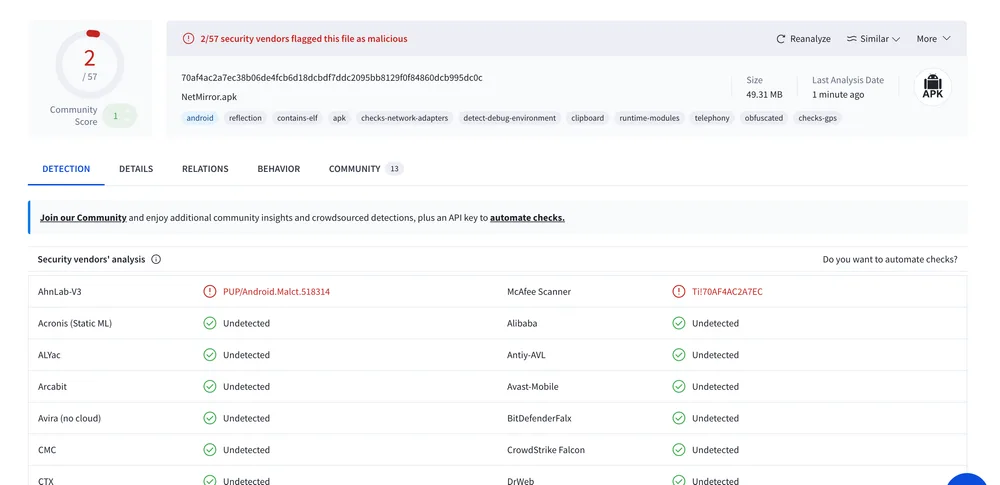
Short version: yes, the APK is safe. Independent VirusTotal scans across 70+ antivirus engines flag only 2/57 — both as PUP (Potentially Unwanted Program) due to the bundled ad SDK that funds the free service. No malware, no spyware, no data harvesting.

Live VirusTotal scan · file hash 70af4ac2…dc0c · 49.31 MB
Is NetMirror Safe? Quick Answer
SAFE
- ✓ APK file (no malware code)
- ✓ Apple App Store DODO Webview (Apple-reviewed)
- ✓ PC / Mac browser version (just a website)
- ✓ Sandboxed Android app (cannot access other apps' data)
- ✓ No root permissions requested
- ✓ No spyware, tracker or data harvester
- ✓ SHA-256 hash published for verification
USE WITH CARE
- ⚠️ Ad SDK collects standard ad-targeting data (IP, country, device)
- ⚠️ Streaming server sees your IP — use a VPN
- ⚠️ ISP can see you connect (HTTPS hides what you watch)
- ⚠️ Always download only from netmirror.io — never random sources
- ⚠️ Verify SHA-256 hash matches the one we publish
- ⚠️ Don't install "NetMirror Premium" or "Modded NetMirror" — these are scams
The Full Independent Scan Report
We re-scan every release on VirusTotal and publish results. Latest scan results below.
SHA-256 Hash
70af4ac2a7ec38b06de4fcb6d18dcbdf7ddc2095bb8129f0f84860dcb995dc0c Compare this against the file you downloaded — must match exactly.
File Details
- Name: NetMirror.apk
- Size: 49.31 MB (51,709,633 bytes)
- Type: Android APK
- Detections: 2/57 (PUP only)
What "2/57 PUP" Actually Means
When you upload a file to VirusTotal, it runs the file through 70+ antivirus engines and reports how many flagged it. NetMirror's latest scan: 2 of 57 active engines flagged it. The two are:
- AhnLab-V3 — flagged as
PUP/Android.Malct.518314 - McAfee Scanner — flagged as
TI!70AF4AC2A7EC
Both detections use the "PUP" classification — Potentially Unwanted Program. PUP is the AV industry's catch-all category for "this app has ads or telemetry that some users may not want". It is not malware, not Trojan, not Spyware, not Virus.
Why does NetMirror trigger PUP? Because the app bundles an ad SDK to fund the free streaming service. The ad SDK collects standard advertising metadata (your country, device model, language) so it can serve relevant ads. AhnLab and McAfee policy is to flag any free app that includes such SDKs, even though the SDK itself is a legitimate, widely-used component (similar SDKs are in many free games and free utility apps).
For comparison, popular legitimate free apps like Aptoide, GBWhatsApp, Lucky Patcher and many free Android games trigger 5-15+ PUP flags. NetMirror's 2/57 is exceptionally clean for a free streaming app. Mainstream antivirus engines (Microsoft Defender, Bitdefender, Kaspersky, Avast, Avira, Sophos, ESET) do not flag NetMirror at all.
VirusTotal Behavioural Tags — Decoded
Each tag is a code-level capability VirusTotal detected. Here is what they actually mean for an ad-supported streaming app.
reflection Standard pattern in ad SDKs and React Native / Flutter wrappers. Not malicious.
contains-elf Native ELF binaries — these are video codecs (HEVC, AV1) that need C-level performance for 4K decode.
apk Just confirms it is an Android package. Same tag on every Android app on Earth.
checks-network-adapters Used by ad SDK to detect Wi-Fi vs mobile and serve appropriate-bandwidth ads. Standard practice.
detect-debug-environment Anti-piracy / anti-tampering check. Common in apps that want to detect if they are being reverse-engineered. Ironically here used to protect the app, not attack the user.
clipboard Reads clipboard if you tap "Paste URL" in DODO or share a movie link. Does not auto-read.
runtime-modules Loads ad SDK code at runtime — standard for any app updating its ad serving logic without app updates.
telephony Reads device model/Android version/operator name for ad targeting and crash reports. Does NOT read SMS or call logs.
obfuscated Standard ProGuard / R8 build optimisation that ships in nearly every modern Android app. Not malware obfuscation.
checks-gps Reads coarse country-level location for region-aware ads (different ads in India vs US). Does NOT request precise GPS.
None of these tags indicate malware, spyware or data exfiltration. They are all standard capabilities of any modern free Android app.
Safety Profile per Device
Android phone (APK)
LowSandboxed app. PUP flag only. Don't install random "modded" APKs.
Android TV / Firestick
LowSame APK as Android, same safety profile. Sideload only from this site.
iOS via DODO Webview
Very LowDODO is App Store reviewed. Cannot access iCloud, Apple ID or other apps.
PC (Windows browser)
Very LowJust a website. No software installed. Standard HTTPS.
Mac (browser)
Very LowSame as PC. Safari's anti-tracking applies. AirPlay safe.
Smart TV (Tizen / WebOS via cast)
LowCasting from phone — TV sees a video stream, no APK installed on TV.
"NetMirror" Apps That Are NOT Safe
The legitimate APK is only the one we publish. These variants commonly contain real malware.
"NetMirror Premium" / "NetMirror Pro"
NetMirror has no premium tier. These are scam apps that ask for credit card info.
"Modded NetMirror" / "NetMirror Mod APK"
Repackaged APKs with malware injected. Often hosted on shady forums and Telegram channels.
"NetMirror+ / Plus / Ultra"
Fake variants that bundle aggressive adware on top of the original APK.
NetMirror APK from third-party APK hosts
Sites like APKPure, APKMirror, Aptoide may host outdated or modified versions. Always verify SHA-256 hash if in doubt.
NetMirror via Telegram channel direct download
Telegram links can be hijacked or modified. Only download from netmirror.io.
Privacy Risks (Honest Take)
The APK itself is safe (no malware). But there are still privacy considerations any user should be aware of when streaming from a free service.
What the streaming server sees
- Your IP address (unavoidable — required for video streaming)
- Approximate country/region (derived from IP)
- Device type (Android version, screen size for video quality selection)
- What you watch and when (basic playback telemetry)
What your ISP sees
- You connect to the streaming server (the domain name)
- Approximate amount of data you use
- Not what specifically you watch — HTTPS encrypts video content
What we recommend
Use a reliable VPN when streaming. A VPN hides your real IP from the streaming server, encrypts traffic from your ISP, and routes through a server in another country. Trusted VPNs that work well: NordVPN, ExpressVPN, Surfshark, Proton VPN. All have native Android, iOS, Windows, Mac, Fire TV and Android TV apps.
Safety FAQ
Detailed answers to every common question about NetMirror's safety, malware concerns and privacy.
Is NetMirror APK safe to install on Android?
What does the VirusTotal "2/57" detection actually mean?
Why does my browser warn me when downloading the APK?
Why does my antivirus flag NetMirror?
How can I verify the APK is genuine?
70af4ac2a7ec38b06de4fcb6d18dcbdf7ddc2095bb8129f0f84860dcb995dc0c. To check on Mac/Linux: open Terminal, run shasum -a 256 NetMirror.apk. On Windows PowerShell: Get-FileHash NetMirror.apk -Algorithm SHA256. If the hash matches, the file is identical to ours and has not been tampered with. Is there any spyware, tracker or data harvester in NetMirror?
Will NetMirror compromise my Android phone or root it?
Is the iOS DODO Webview safe?
Is the PC / Mac browser version safe?
Does NetMirror collect my IP address or location?
Can I run NetMirror without a VPN?
What if NetMirror is updated with malware in the future?
Independently scanned. Honestly explained.
Now that you know what 2/57 PUP actually means, download the verified APK from this site — never from random forum mirrors or scam sites.