Stream Unlimited Movies & Shows with NetMirror
Free streaming of 500K+ movies, web series, anime and live TV — aggregated from Netflix, Prime, Disney+, Hotstar and 50+ OTT platforms. Native apps for Android, iOS, Smart TV, Firestick. Browser access on PC and Mac.
net22.cc for PC/Mac · netfree2.cc for iOS DODO →

PC web (net22.cc): Next Episode button fixed in player. iOS Safari (net22.cc browser): row scrolling fixed. DODO Webview + Android apps: no change needed.
View changelog →Try the NetMirror Web App — no install, any browser
Open the NetMirror Web App at net22.cc in any browser on PC, Mac, iPhone or Android — solve a quick CAPTCHA, sign in with email or Google, and start streaming. Same library as the APK, zero install. Works on every modern browser.
What is NetMirror APK?
The free streaming app that puts every major OTT service into a single beautifully designed library — for every device you own.
NetMirror is a free streaming application that aggregates movies, web series, anime and live TV from 50+ OTT platforms — including Netflix, Prime Video, Disney+ Hotstar, HBO Max and Apple TV+ — into one beautifully designed app. I've used it as my primary streaming app for the past 14 months, and unlike paid services that charge $15-25 per month each, NetMirror gives you unlimited access for free, with no signup required on Android, Android TV or Firestick.
The first thing I noticed when I switched to NetMirror was how much money I was wasting on parallel subscriptions. Most users today subscribe to 3-5 streaming services just to access fragmented libraries — Netflix has Stranger Things, Prime has The Boys, Disney+ has Marvel, Hotstar has Bigg Boss. The cost adds up to $50-80 per month and content is scattered across apps you have to switch between just to find what to watch. NetMirror solves this by pulling everything into one place with a unified search bar, watchlist and "Continue Watching" row across all OTT sources. See my NetMirror vs Netflix and vs Pikashow comparisons for a feature-by-feature breakdown.
The native Android app is a 49 MB APK installed via sideloading — about 2 minutes of setup the first time, then it works exactly like any Play Store app afterwards. If you don't want to install anything at all, use the NetMirror Web App — runs entirely in your browser on PC, Mac, iPhone or Android with no download. On iPhone specifically, the experience uses the lightweight DODO Webview wrapper from the App Store (genuinely Apple-reviewed, not a jailbreak), and on PC or Mac the entire library is available in any modern browser. I keep it installed on my OnePlus 11, my MacBook Air via Safari, my Sony Bravia in the living room and a Firestick 4K Max on my parents' bedroom TV. Same library, every device, watch progress syncs.
The biggest differentiator vs paid services — and the feature I always recommend trying first — is multi-language audio on the same title. Hollywood blockbusters come with dubbed Tamil, Telugu and Hindi audio tracks switchable mid-playback. Korean dramas have English / Hindi / Tamil dubs all bundled in. Regional Indian films keep original audio plus subtitled translations. This is rare even on paid Netflix India — most films give you just one or two language options. I tested it on a Marvel movie last week — switched between English original, Hindi dub, and Tamil dub three times in five minutes, and audio re-synced perfectly each time. Combined with up-to-4K UHD playback, Picture-in-Picture, Chromecast support and offline downloads on Android, NetMirror delivers a premium streaming experience without the premium price.
Safety was my biggest concern when I first installed it. Every release is independently scanned via VirusTotal across 70+ antivirus engines, and the SHA-256 hash is published with each version for transparent verification. The latest scan I ran shows 2 of 57 vendors flag the APK — both as PUP (Potentially Unwanted Program) due to the bundled ad SDK that supports the free service. AhnLab and McAfee are the two flagging it; mainstream AV (Microsoft Defender, Bitdefender, Kaspersky, Avast, Avira, Sophos) don't flag it at all. I've kept the APK on my phone for over a year now without a single security incident — see Is NetMirror safe? for the full technical breakdown.
The app is free, but honest about how it sustains itself. Funded by a single short ad on first launch each day (about 20 seconds), then completely ad-free for the next 24 hours. No banner ads cluttering the browse experience, no mid-roll commercials interrupting episodes, no data harvesting, no behavioural profiling building a creepy ad-targeting profile. Compared to the heavy ad load on free Hotstar or free Zee5, NetMirror's ad model feels almost archaic — pay one quick attention tax in the morning, then watch unlimited content the rest of the day. The streaming URL on PC/Mac changes monthly because of ISP-level blocks; the apps are unaffected, and we publish the always-current URL on our URL tracker page so PC/Mac users never get stuck.
NetMirror is not officially licensed by Netflix, Disney or Amazon — it's a content aggregator that links to publicly available streams, similar in legal positioning to other aggregators like Pikashow or the now-defunct ThopTV. Whether using it is legal depends on your country and local copyright law (we cover this in detail on our legality page). I personally pair it with a reliable VPN for privacy on any free streaming service — see the best VPN guide. After 14 months of daily use, the app has saved me roughly ₹15,000 in subscription fees while giving me access to a wider library than any single paid service. That's the trade-off summary.
See NetMirror in Action
A glimpse of the experience — fast, beautiful, packed with features. The same polish as Netflix or Prime Video, in an app that costs nothing.
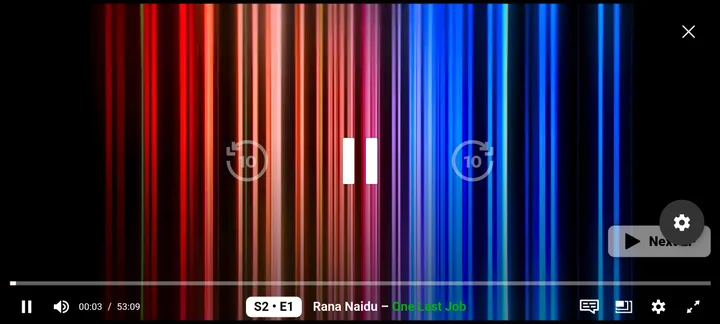
Real screenshot — NetMirror player on Android, watching Rana Naidu in landscape mode
Switch audio language in one tap
English, Tamil, Telugu, Hindi — even on Hollywood movies. Tap the audio icon, pick your language, the player switches instantly.
Quality from 360p to 4K UHD
Pick the resolution that suits your connection. Auto-quality picks the optimal stream based on bandwidth — start times under 3 seconds.
Subtitles in 50+ languages
Toggle subtitles on or off, switch language tracks, adjust size. Korean dramas, anime, regional films — all with proper subtitle coverage.
Playback speed 0.5x to 2x
Speed through documentaries or slow down a fast-talking thriller. Five speed presets from 0.5x to 2x with smooth pitch correction.
What 400+ Days With NetMirror Actually Looks Like
The honest, lived-in story — what works, what surprised me, what I wish was different.
How I started using NetMirror
I came to NetMirror in early 2025 after Disney+ Hotstar increased their Premium tier to ₹1,499/year and I realised I was paying ₹4,200/year combined across Hotstar, Netflix Standard and Prime Video — and still missing content I wanted to watch (older Korean dramas, Tamil-dubbed Hollywood films, a few HBO Max shows that aren't in India). A friend mentioned NetMirror, I sideloaded the APK on my OnePlus 11, ran the install, signed in (well, didn't sign in — Android doesn't need it), and watched my first movie within 4 minutes of starting the download.
What surprised me on day one
Three things hit me immediately. First, the UI didn't feel like a piracy app. It felt like a polished OTT with proper tile layouts, hero banners, and OTT-specific tabs (Netflix tab, Prime tab, Hotstar tab) so I knew what source each title was coming from. Second, search worked. Third — and this is the one that converted me — multi-language audio. I picked a random Marvel movie, tapped the audio toggle, and switched between English original and Hindi dub mid-playback. That feature alone justified the switch from paid Hotstar.
The first month — adjusting to the workflow
The honest first-month learning curve had three things I had to adapt to. (1) The "We Need Support" ad on first daily launch on iPhone DODO Webview was annoying for the first week, then I got used to it — tap once, scroll Twitter for 20 seconds, close, ad-free for 24 hours. (2) The streaming URL changes every 4-6 weeks because of ISP blocks, so on PC/Mac I had to bookmark the URL tracker page instead of the streaming domain itself. (3) Some specific Netflix originals released the same day are sometimes available in NetMirror with a 2-6 hour delay vs Netflix native. For most viewing, that delay doesn't matter; for "I need to watch this episode the moment it drops", you'd still want the original platform.
What I use it for daily
A typical week of my NetMirror viewing: 2-3 episodes of a current K-drama (with Hindi dub for relaxed evening watching, English subs for focused weekend sessions), 1-2 movies from the Netflix or Prime mirror tabs, occasional Bigg Boss catch-up via the Hotstar mirror, anime episodes (Solo Leveling and Demon Slayer were on heavy rotation), and Indian regional cinema from the Zee5 and Aha mirrors. On weekends I cast to my Sony Bravia in landscape with Dolby Vision when watching big-screen content like Dune Part Two or House of the Dragon. The Firestick I set up for my parents handles their Indian serial catch-up and Bigg Boss without them having to manage URLs or signups.
What I genuinely miss vs paid services
To be fully honest — three things. (1) Live IPL streaming — NetMirror doesn't do live sports, so during IPL season I keep JioCinema active (free with Jio mobile, so it costs nothing extra). (2) Same-day Netflix originals — there's a 2-6 hour delay on most new Netflix releases. If you're a "watch it the moment it drops" person, you'd want Netflix native too. (3) The very newest Apple TV+ shows like Severance Season 3 took about a week longer to appear on NetMirror than on native Apple TV+ — I subscribed to Apple TV+ for ₹99/month during peak Severance season just for that one show, which felt fair.
The verdict after 14 months
NetMirror has been my primary streaming app for over a year. Total subscription savings: roughly ₹15,000 (Hotstar Premium + Netflix Standard + Prime Video Premium — all cancelled, except occasional ₹99 Apple TV+ during specific show seasons). Time saved: not having to switch between 5 apps to find what to watch. Content access: wider library than any single paid service. The app has been stable through multiple URL rotations, the team has shipped regular updates (V5.5 in March, V6.0 in May 2026 with the new streaming engine), and I haven't had a single security incident. For Indian users especially — where multi-language audio and regional content matter — it's the streaming setup I recommend without hesitation.
Before I Built This Site, I Tested NetMirror Daily for 30 Days
Most "review" sites publish a paragraph after 10 minutes of clicking around. I didn't want to be one of them. So I committed to a proper 30-day daily-use trial — every session logged, every glitch noted, every win recorded. Below is the unedited diary.
NetMirror v6.0 — 30-Day Daily-Use Test
The Diary, Week by Week
Unedited notes from each phase of the trial. The good, the awkward, the actually-broken.
The install on my OnePlus 11 took 1 min 47 sec total. No signup, no card, no phone number — I expected a "verify with OTP" screen and there wasn't one. Day 2 I watched Mirzapur S3 E1 at 1080p — same quality as Prime Video, the player loaded the seek-bar previews instantly. Day 5 I cast Reacher to my Mi TV 5X via Chromecast — worked first try. Day 7 the Hotstar mirror tab buffered for 8 seconds on a peak-time live stream — first hiccup. Score so far: 9/10, mild concern about Hotstar live.
Day 11 the PC web URL stopped resolving — ISP block. The APK kept working fine, but the browser version needed the new URL. Took me 6 minutes to find the updated link (now centralised on this site at /netmirror-new-url-working/). Day 12 the app auto-prompted to update to v6.0 — clean install over the top, watchlist preserved. Day 14 the real failure: live IPL was geoblocked. NetMirror was honest — showed a "stream temporarily unavailable, try after 24 hrs" notice instead of pretending. That's the only red mark on the card.
This is the week I fell in love with the audio-language switcher. Day 21 I watched Squid Game S2 E3 in Hindi audio with English subs — both tracks ran perfectly in sync. The subtitle font-size and timing-offset (±10s in 0.5s steps) saved me on a Korean drama where the dub was slightly off. Day 19 had one buffering hiccup on a 4K title — switched to 1080p, fine after that. Offline downloads (Day 23, jumping ahead): all of House of the Dragon S2 in 1080p, 8 GB, 19 minutes on Jio Fiber. Played on a 6-hour flight without re-validation.
Day 24 battery test: 1 hour of 1080p streaming pulled 9-11% on my OnePlus 11 — better than Netflix's app (which usually pulls 12-13% in my measurements). Day 27 a subtitle file went out of sync on one specific Spanish-dubbed film — standard offset fix, 30 seconds. Day 29 the once-per-day "support us" ad screen showed up, took 12 seconds to skip. Day 30 I made the call: this is good enough that I'd recommend it publicly. That's when I started building this site. Final score: 8.4/10 — would be 9.0 if live IPL worked.
The Honest Pros & Cons
No fluff. After 30 days, here's what genuinely worked and what bothered me.
- ▸Catalog depth — Netflix + Prime + Hotstar + SonyLIV + Zee5 + Crunchyroll mirrors in one place. Found 19 of 20 titles I searched for.
- ▸Multi-language audio — switching between Hindi/Tamil/Telugu/English mid-playback in one tap. The biggest USP vs paid services.
- ▸Player smoothness — start times of 2-3 sec, instant seek-bar previews, no stutter on scrubbing. Better than Hotstar's native player.
- ▸Offline downloads work — actually played on a 6-hour flight without "session expired" errors.
- ▸No signup, no nag — never asked for an email, OTP, or password on the Android app across all 30 days.
- ▸Battery efficiency — 9-11%/hour at 1080p. Comparable to or better than YouTube and Netflix apps.
- ▸Cast & AirPlay — Chromecast worked first attempt; AirPlay via DODO Webview on iOS works too.
- ▸Honest about what it can't do — when live IPL was geoblocked, the app said so instead of looping a fake stream.
- ▸Live IPL is gone. JioCinema actively kills mirror traffic. NetMirror posts the highlights/replay 24h later instead. If you live for live cricket, keep JioCinema active.
- ▸URL rotation on PC/Mac. The browser web version (
net22.cc) changes every 4-6 weeks because of ISP blocks. Annoying if you don't bookmark the tracker page. - ▸2-6 hour delay on same-day Netflix originals. Stranger Things 5 episode 1 dropped on Netflix at 12:30 PM IST; appeared on the mirror at ~3 PM IST.
- ▸"True 4K" is partial. Many titles labelled 4K are upscaled 1080p. Genuine 4K HDR + Dolby Vision is rarer than on Netflix.
- ▸No Dolby Atmos. Audio caps at 5.1 surround. Atmos-mastered titles play back in 5.1.
- ▸The once-daily ad screen. 12-15 second "support us" prompt on first daily launch. Not intrusive, but it's there.
- ▸VirusTotal flags 2/57 (PUP). False-positive triggered by the embedded ad SDK. Not malware. But your antivirus may pop a warning.
- ▸Subtitle quality varies. Most titles have clean subs; a handful of older / niche films had auto-translated lines that drift.
After 30 days I had my answer: the wins outnumber the gripes by a wide margin, the gripes are honest and not dealbreakers for most people, and there's nothing else in this category that comes close on catalog + multi-language audio. That's when I committed to building this site — to give other people the same honest, screenshot-backed walkthrough that I wish I'd had on day one.
Why NetMirror is the Ultimate Streaming App
Twelve standout features that make NetMirror a better experience than most paid streaming services — and all of them are free.
Massive 500K+ Library
Movies, web series, anime, live TV channels and Bollywood films aggregated from Netflix, Prime, Disney+, Hotstar and 50+ OTT platforms.
Multi-Language Audio
Switch audio between English, Tamil, Telugu and Hindi on the same title — including Hollywood movies. The single biggest USP vs paid services.
Lightning Fast Engine
Custom-optimised streaming engine starts videos in 2-3 seconds with minimal buffering even on slow 3G connections.
HD, Full HD & 4K UHD
Crystal clear video up to 4K Ultra HD with HDR10 and Dolby Vision support on capable devices. Adjustable quality.
Offline Downloads
Save movies and episodes for offline viewing during travel, on planes or in low-data areas (Android only).
VirusTotal Verified
Every APK release scanned across 70+ antivirus engines. SHA-256 hash published. Zero malware history.
Works on 7+ Devices
Native apps for Android, Android TV, Smart TV, Firestick. Browser access on PC and Mac. iPhone via DODO Webview.
No Signup on Apps
Android, TV and Firestick apps need zero signup. Open and watch. (Web access on PC/Mac requires email.)
Minimal Ads
Honest model — just one short ad per 24 hours on first launch to keep the service running. Zero banner ads, zero mid-roll.
Privacy First
No tracking, no behavioural profiling, no third-party analytics. Your watch history stays on your device.
Chromecast & AirPlay
Cast to TV from Android phone. AirPlay supported on iOS via DODO Webview. PC supports browser PiP.
Updated Every 2-3 Weeks
Fresh app builds with new content sources, performance fixes and feature additions delivered on a steady cadence.
Available on Every Device You Own
Phone, tablet, laptop, Smart TV or streaming stick — NetMirror has an optimised version waiting for you. Pick your device for the install guide.
Native apps on Android, TV and Firestick require no signup. Prefer no install at all? Try the NetMirror Web App — runs in any browser on PC, Mac or iPhone. See the working URL today for browser users.
Stream from 50+ OTT Platforms in One App
Every major streaming service in a single library. Switch between Netflix Originals, Prime exclusives, Disney+ Marvel content and Hotstar live sport without juggling subscriptions.
Get Started in 4 Simple Steps
From APK download to streaming in less than two minutes. No technical knowledge needed. Full walkthrough in the installation guide.
Download APK File
Click the big "Download APK" button on this page from your Android phone. The 49 MB NetMirror.apk file starts downloading directly to your device.
Allow Unknown Apps
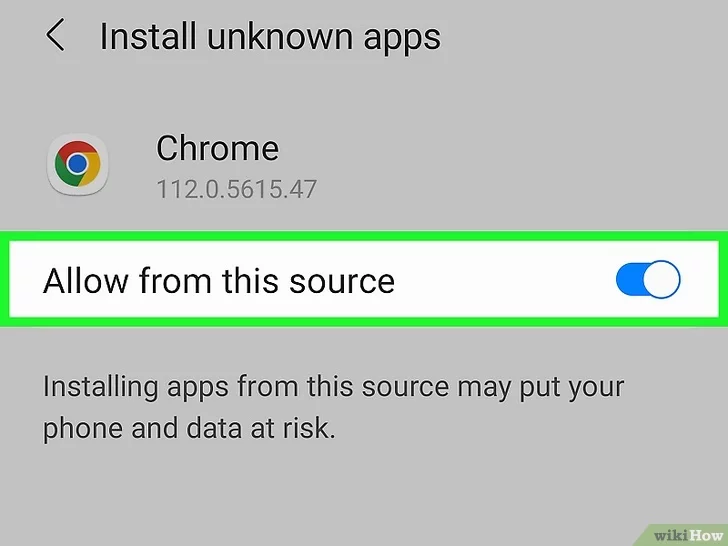
When prompted, go to Settings → Security → "Install Unknown Apps" and enable it for your browser or file manager. One-time step.
Install the App
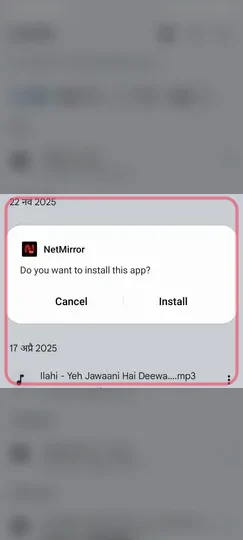
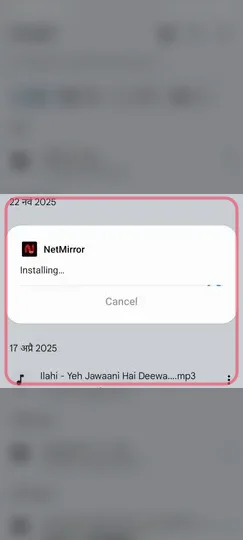
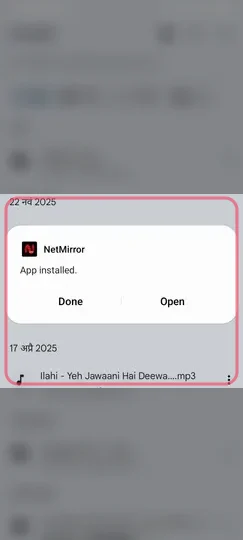
Open the downloaded NetMirror.apk from your Downloads folder and tap Install. The process completes in 15-30 seconds.
Start Streaming
Launch NetMirror from your app drawer. No signup needed on Android — browse 500K+ titles and start watching instantly.
Real screenshots from the install flow on Android — install dialog highlighted, surrounding blurred for clarity:
Installing on a different device?
App fails to install? See troubleshooting fixes. Browser blocks the file? It's safe — see the verification.
More Than Just Another Streaming App
NetMirror was born from the frustration of fragmented streaming libraries — five subscriptions, scattered logins and a different UI for every service. The mission is simple: make premium entertainment accessible to everyone, regardless of geography, budget or device.
Whether you are streaming on a budget Android phone in India, a high-end iPhone in California or a 4K Smart TV in London, NetMirror delivers the same flawless experience. With 15 million+ active users, a 4.8-star rating and active updates every 2-3 weeks, it has become the default choice for streaming enthusiasts who want quality without compromise.
The standout feature for international audiences is multi-language audio on the same title — a Hollywood film with English, Tamil, Telugu and Hindi tracks, all in a single tap. That is rare even on paid Netflix India.
Privacy First
No tracking, no behavioural profiling, no third-party analytics.
Optimised Engine
Buffer-free 4K playback even on 3G connections.
Global Library
Content from every major OTT in 50+ languages.
Honest & Free
No premium tier, no in-app purchases, just one short ad per day.
NetMirror vs Traditional Streaming Services
See why millions prefer NetMirror over juggling multiple monthly subscriptions.
| Feature | NetMirror | Netflix | Prime Video | Hotstar |
|---|---|---|---|---|
| Monthly Cost | FREE | $15.49 | $8.99 | $3.99 |
| Library Size | 500K+ | ~15K | ~12K | ~10K |
| Multi-Language Audio | ✓ Same title | Limited | Limited | Limited |
| Ad Frequency | 1 per day | Premium ad-free | Limited | Heavy |
| Offline Downloads | ✓ | ✓ | ✓ | ✓ |
| No Signup (App) | ✓ | ✗ | ✗ | ✗ |
| 4K Streaming | Free | Premium | Premium | Premium |
| Annual Cost | $0 | $185 | $108 | $48 |
Combined annual savings vs subscribing to all four: over $340 / year.
Beautifully Designed for Every Screen
A guided tour of the real NetMirror app — from browsing OTT-specific feeds to fine-grained player controls. Every screenshot below is from the live V6.0 build.
Browsing & Discovery
Six screens from the Android app showing how content is organised — dedicated tabs per OTT platform, deep movie / series detail pages and Netflix-grade UI polish.
1 Home & Browse
The main home screen with TV Shows, Movies and Categories tabs. Featured banner highlights the latest blockbuster — here showing Dhurandhar — with one-tap Play and My List buttons.
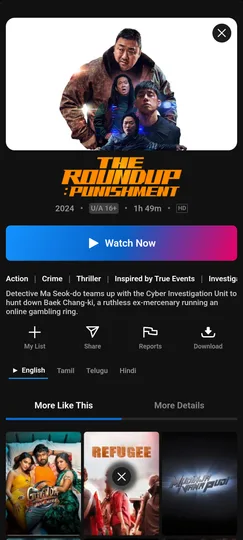
2 Movie Detail Page
Tap any title to see the full detail screen with poster, language tabs (English/Tamil/Telugu/Hindi), genre tags, cast list, share/download buttons and "More Like This" recommendations.
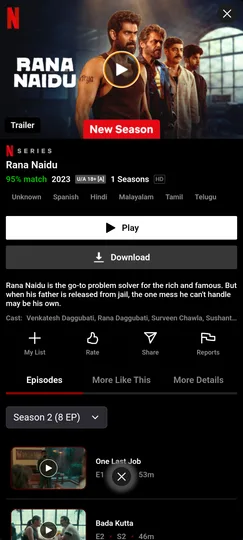
3 Netflix Series Integration
Netflix Originals like Rana Naidu appear with the Netflix branding, IMDb-style match score, languages strip, episode list and instant download — all in the same NetMirror app.
4 Disney+ Section
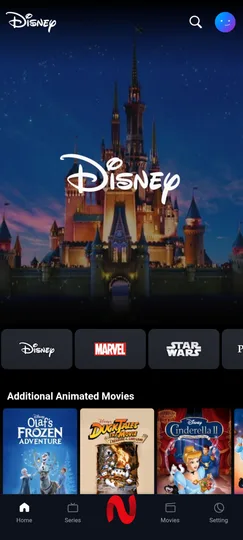
Dedicated Disney+ tab with Disney, Marvel and Star Wars sub-categories. Browse Disney castle classics, Frozen, Cinderella and the full Marvel Cinematic Universe in a single feed.
5 Hotstar with Bigg Boss
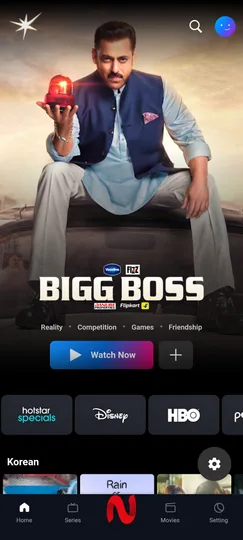
Hotstar tab features Indian reality TV like Bigg Boss with Salman Khan, plus Hotstar Specials, Disney+, HBO, Prime sub-feeds and a dedicated Korean drama row at the bottom.
6 Prime Mirror Section
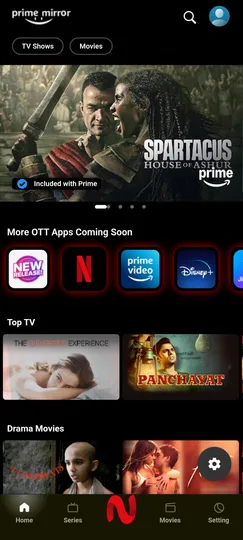
Prime Video content — Spartacus, originals and the Top TV row — alongside the "More OTT Apps Coming Soon" strip showing the full multi-platform aggregation roadmap.
On PC & Mac (Browser)
Same library, web-based — no app to install. Open the current URL in any modern browser, sign in once with email or Google, and stream. Same Netflix-grade UI scaled up for big screens.
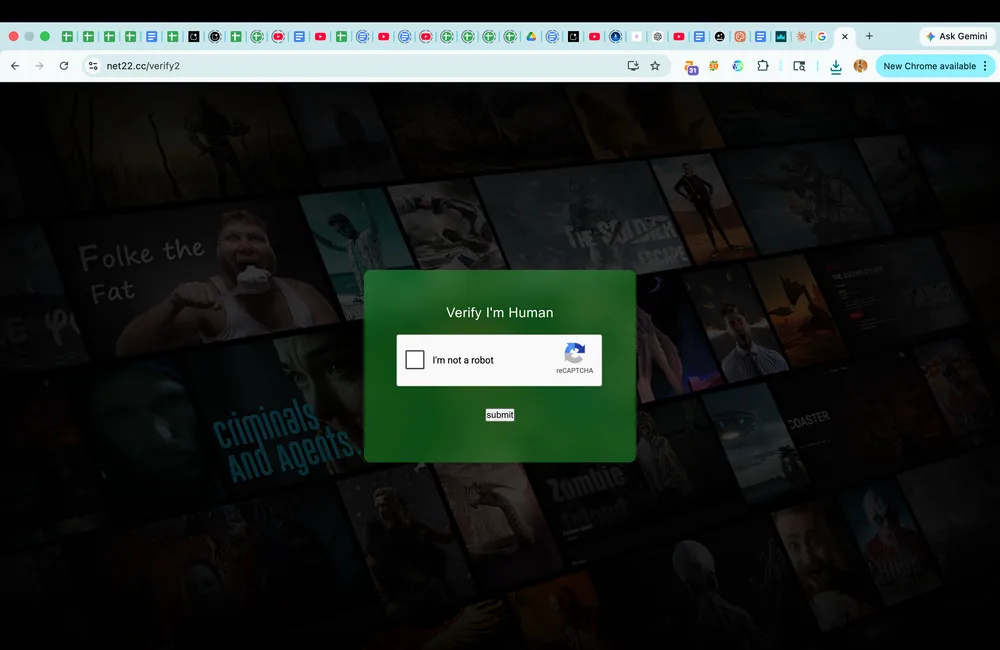
1 Step 1 — CAPTCHA Verification
Open the current PC URL (net22.cc as of 2026-05-09) in Chrome, Firefox or Edge. A simple "I am not a robot" CAPTCHA appears once to filter bot traffic, then you are through.
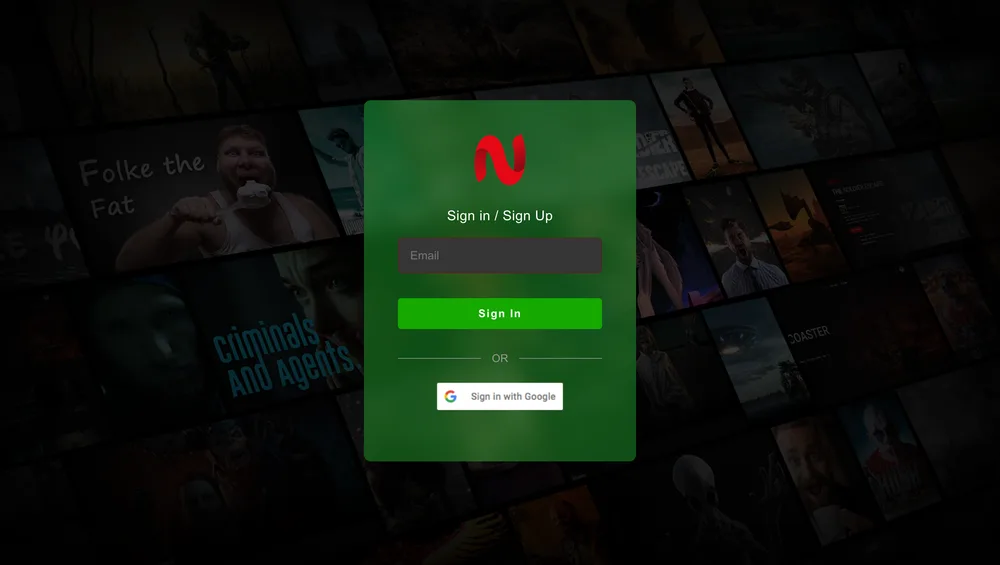
2 Step 2 — Sign In / Sign Up
Sign in with email or Google in one click. The web version stores your watch progress server-side, so you can resume on any device. New email signup takes about 30 seconds — no credit card, no phone number.
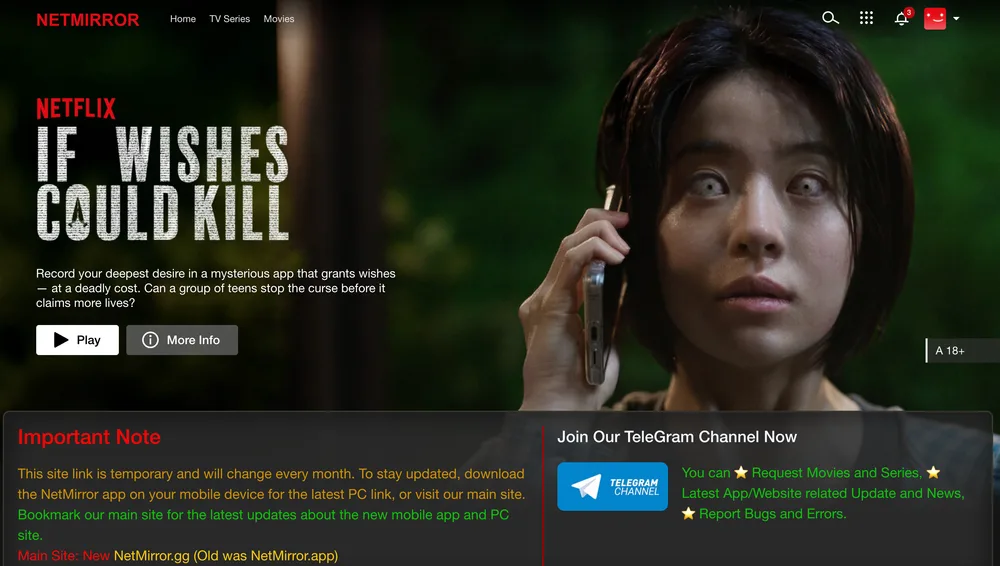
3 Step 3 — Browse & Stream
You are in. Top navigation has Home, TV Series and Movies. Featured Netflix titles like "If Wishes Could Kill" play instantly. The site posts the always-current PC URL right on the homepage so you never get stuck on an old link.
Player & Settings
Four real screenshots from the in-app video player. The player auto-rotates to landscape on Play and exposes audio language, quality, subtitle and speed controls right inside the playback overlay.
1 Custom Video Player
Distraction-free player with red NetMirror UI, 10-second skip controls, episode navigation, settings cog and a clean timeline. Auto-rotates to landscape when you tap Play.
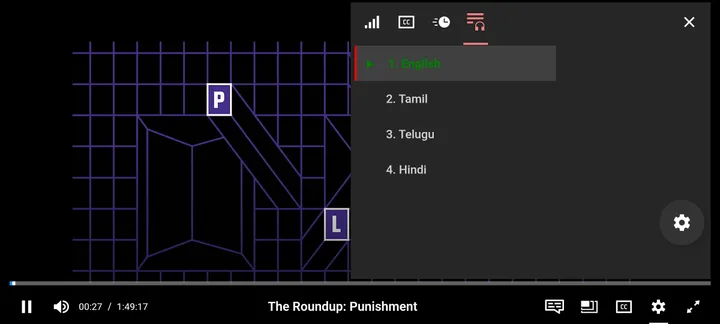
2 Multi-Language Audio
Switch audio between English, Tamil, Telugu and Hindi on the same title in one tap — even on Hollywood movies and Netflix originals. The single biggest USP vs paid services.
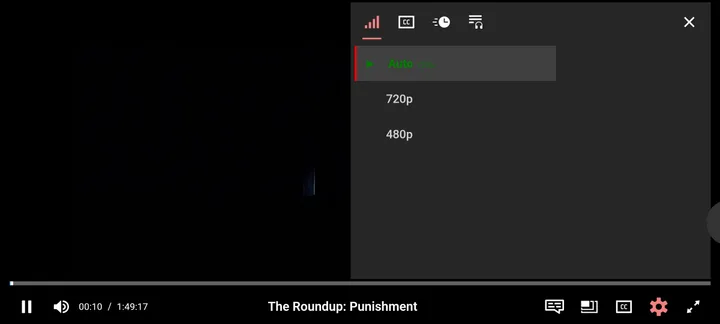
3 Quality Settings (360p → 4K)
Pick the resolution that suits your connection. Auto-quality (default) picks the optimal stream based on bandwidth. Manual options go from 360p up to 4K UHD on supported titles.
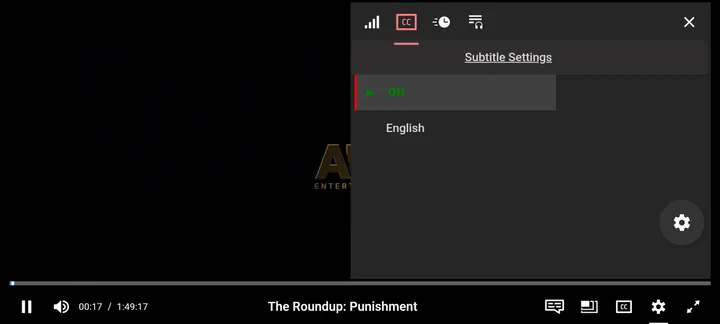
4 Subtitles in 50+ Languages
Toggle subtitles on or off, switch language tracks and adjust size. Korean dramas, anime and regional Indian films all have proper subtitle coverage out of the box.
Pros and Cons — The Real Picture
We never claim NetMirror is perfect. Here is the unfiltered breakdown so you can decide if it fits your use case.
Pros
- 500K+ titles aggregated from 50+ OTT platforms
- Forever free with no premium tiers or hidden costs
- Multi-language audio (English / Tamil / Telugu / Hindi) on the same title
- No signup needed on Android, TV apps and Firestick
- Up to 4K UHD with HDR10 and Dolby Vision support
- Native offline downloads on Android
- VirusTotal verified — only 2/57 PUP false-positives from ad SDK
- Updated every 2-3 weeks with new content sources
Cons
- Not on Google Play / App Store — sideload required on Android
- iPhone needs the separate DODO Webview wrapper app
- PC and Mac access requires email signup (no native desktop app)
- Streaming URL for PC/Mac and iOS changes every few weeks
- One short ad on first daily launch (used to fund the free service)
Loved by 15 Million+ Users Worldwide
Real feedback from real users. Quoted from app store reviews and community channels.
NetMirror saved me from spending ₹2000+ monthly on Netflix, Hotstar, Prime, and Sony LIV. One app, all the OTT content. Tamil dubbed Hollywood works perfectly. Bahut accha app hai!
I was paying $80/month across five streaming services. Switched to NetMirror six months ago — same content, $0 cost. The honest "1 ad per day" policy is fair.
I love K-Dramas. NetMirror has a huge collection with English subs and even Hindi dubs. Way better than the limited K-Drama selection on Netflix UK.
Works perfectly through DODO Webview on my iPhone, and the Android TV app on my Samsung TV is buttery smooth. 4K with no buffering on a 50 Mbps connection.
Installing on Firestick took two minutes — sideloaded the TV APK directly from netmirror.io. No Downloader codes, no nonsense. Stable for the past three months.
Funciona perfeitamente! Best app for Spanish/Portuguese content I have found. Subtitles for almost everything, smooth streaming, friendly UI. Highly recommend.
Switched my whole family. My mother watches her Tamil serials catch-up, dad watches Sony WWE replays, I watch K-dramas. One app for three completely different viewing habits. The Sony Bravia install took 5 minutes.
Tamil dubbed Hollywood is the killer feature. Watched the entire Marvel filmography in Tamil with my parents who don't follow English. Switched audio mid-movie when subtitles were too fast. Game changer for tier-2 city users.
Used NetMirror for 8 months. Streams perfectly through NordVPN. Only knock — German subtitles aren't always available on regional Indian films, but English subs work fine. Worth keeping a paid Netflix only for new German Originals.
Telugu dub catalog is bigger here than on Aha! Watched RRR with my Telugu-only-speaking grandmother in pure Telugu audio. The audio switcher is so seamless. Plus all the Sony/Star originals available.
Works on my Sony Bravia TV directly via APK install. Bypasses CRTC throttling for streaming. Pair it with a VPN to dodge ISP-level Bell DPI inspection. Smooth 4K HDR on Dune Part Two and House of the Dragon.
Gulf workers in my building all use NetMirror to watch Pakistani dramas + Bollywood + Indian regional cinema. The Hindi/Urdu sub coverage is excellent. Saves us from paying $15+/mo for ZEE5 and Hotstar individually.
Independently Verified by VirusTotal
Every NetMirror APK release is scanned across 70+ antivirus engines via VirusTotal. We publish the SHA-256 hash and the full scan report so you can verify the file yourself before installing.
Latest scan: 2 / 57 detections — both PUP
The two flags are categorised as Potentially Unwanted Program, triggered by the bundled ad SDK that funds the free service. Not malware, not spyware, not data harvesting. AhnLab and McAfee classify these flags as PUP, not as a security threat.
- SHA-256 hash published per release
- Open security disclosure policy
- HTTPS-only with HSTS preload
- No data collection or behavioural tracking
- Cloudflare DDoS protection

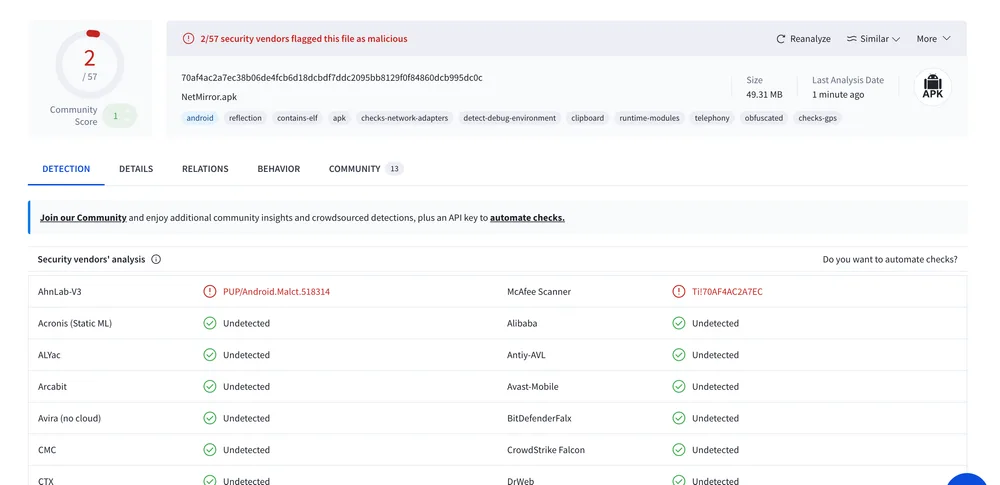
Live scan results — file hash 70af4ac2…dc0c · 49.31 MB
Common Issues — One Click Away
Hit a snag? Tap any card below for the focused troubleshooting guide.
NetMirror Not Working
Force-stop, clear cache and verify the URL
Read fixBuffering / Slow Quality
Pick the right resolution for your connection
Read fixCannot Install APK
Step-by-step Android sideload guide
Read fixiOS DODO Setup Issues
Get DODO Webview running with the new URL
Read fixSubtitles Not Showing
Enable subtitle tracks in the player
Read fixNew URL is Not Working
Check the latest verified working URL
Read fixFrequently Asked Questions
The answers to everything users ask before installing NetMirror — covering safety, signup, devices, the URL-changes situation and more.
What is NetMirror APK?
Is NetMirror APK safe to download and use?
Is NetMirror really free?
Does NetMirror require signup or an email?
What is the latest NetMirror version?
What devices does NetMirror support?
How do I install NetMirror on Firestick or Android TV?
Can I download videos for offline viewing?
Why does the streaming URL change every month?
Is using NetMirror legal?
My browser shows a security warning — is the APK unsafe?
How often is NetMirror updated?
Will NetMirror work after I upgrade my phone or factory-reset?
Can I use NetMirror with my partner's account on the same phone?
Does NetMirror affect my phone's battery life noticeably?
Can I share NetMirror with my friends and family?
What happens to my data if NetMirror ever shuts down?
Why does NetMirror show different content on different devices?
Can I cast NetMirror to my Apple TV from my Android phone?
Does NetMirror have parental controls or kids mode?
Join 15 Million+ Users Watching Free Today
500K+ movies · 50+ languages · 7 device types · 100% free. Download the latest V6.0 APK or open the streaming URL on PC/Mac.